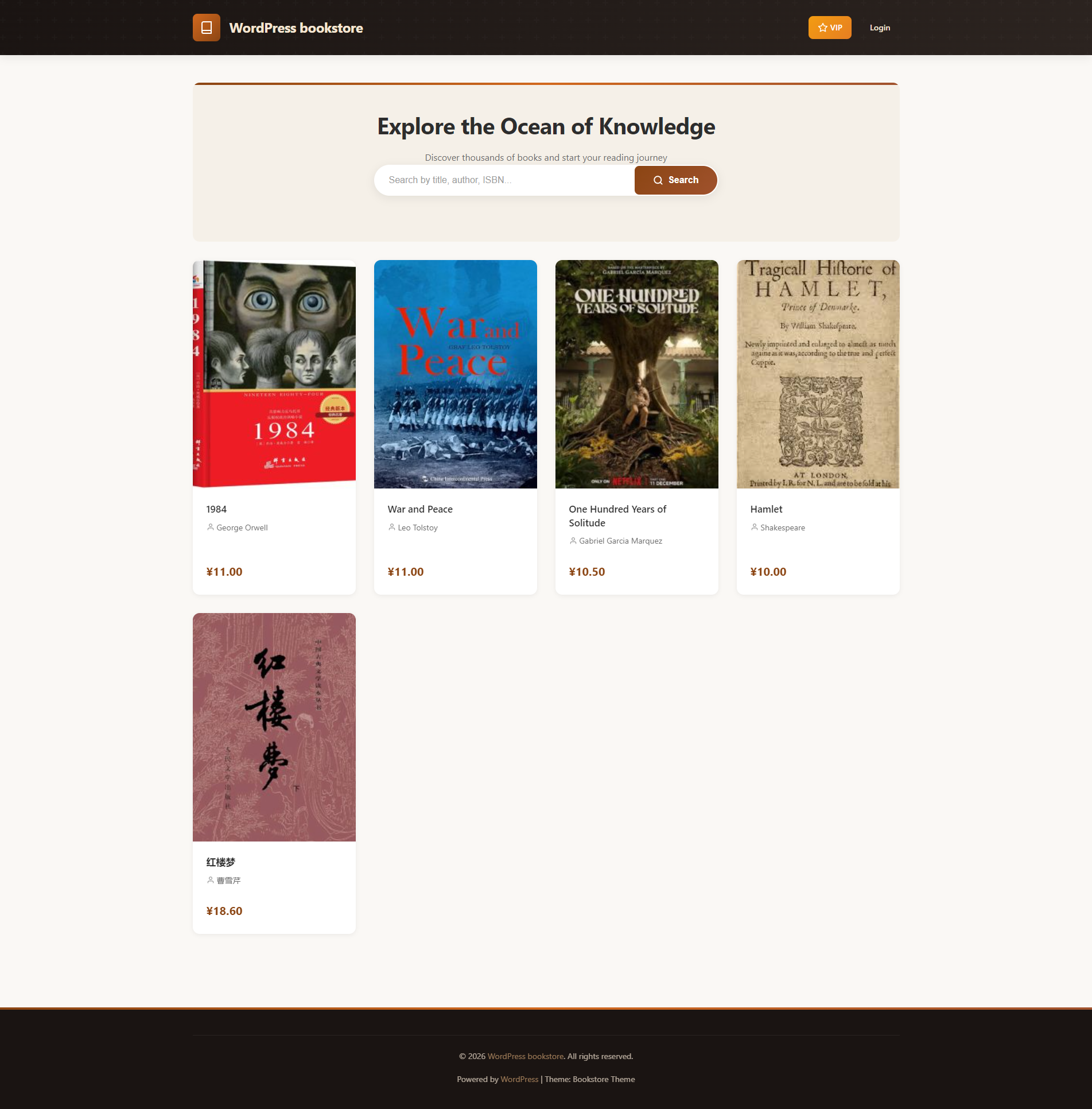
A professional WordPress theme designed for online bookstores. Clean, elegant, and feature-rich.
Requirements
This theme requires the Bookstore Core plugin to function properly. The plugin is free to download and use.
Features
📚 Book Management (via Bookstore Core Plugin)
- Custom book post type
- Book categories and tags support
- Book detail fields (author, ISBN, publisher, pages)
- Featured cover image support
🎨 Design
- Responsive layout, perfect for mobile devices
- Warm brown color scheme
- Elegant card-style book display
- Smooth animation effects
🔍 Search & Filter
- Book search functionality
- Category filtering
- Tag browsing
📱 User Experience
- Book detail pages
- Comment system support
- Post navigation
🔎 SEO Optimization
- Meta Tags: Auto-generated title, description, keywords
- Open Graph: Social sharing optimization for Facebook, LinkedIn
- Twitter Cards: Large image cards for Twitter sharing
- Schema.org: Structured data for books (JSON-LD)
- Breadcrumbs: Navigation with Schema.org markup
- XML Sitemap: Auto-generated sitemap at
/?bookstore_sitemap=1 - Canonical URLs: Prevent duplicate content issues
- Image SEO: Lazy loading, auto alt text, aspect ratio
- Core Web Vitals: Performance optimizations
Installation
Step 1: Install Theme
- Go to WordPress Admin → Appearance → Themes
- Click “Add New” → “Upload Theme”
- Select the theme zip file and upload
- Click “Activate”
Step 2: Install Required Plugin
- After activating the theme, you’ll see a notice to install Bookstore Core
- Download for free from: https://wp.mianka.xyz/?plugin=bookstore-core
- Go to Plugins → Add New → Upload Plugin
- Upload and activate the plugin
Step 3: Configure
- Set up menus (Appearance → Menus)
- Set up widgets (Appearance → Widgets)
- Add your books (Books → Add New)
Basic Configuration
1. Set Up Menus
- Go to Appearance → Menus
- Create a new menu
- Add pages, categories, and other links
- Check “Primary Menu” location
- Save the menu
2. Set Up Widgets
- Go to Appearance → Widgets
- Drag widgets to sidebar or footer areas
- Configure widget content
3. Add Books
- Go to Books → Add New
- Enter book title and content
- Set book cover (Featured Image)
- Fill in book details (author, ISBN, publisher, pages)
- Select categories and tags
- Publish
Theme Customization
Custom Logo
- Go to Appearance → Customize
- Click “Site Identity”
- Upload logo image
Custom Background
- Go to Appearance → Customize
- Click “Background”
- Choose background color or image
File Structure
bookstore-lite/
├── style.css              # Theme styles
├── functions.php          # Theme functions
├── index.php              # Home template
├── header.php             # Header template
├── footer.php             # Footer template
├── single-book.php        # Book detail page
├── archive-book.php       # Book archive
├── page.php               # Page template
├── page-vip.php           # VIP page template
├── page-downloads.php     # Downloads page template
├── sidebar.php            # Sidebar template
├── assets/
│   ├── css/               # Stylesheets
│   ├── js/                # JavaScript files
│   └── images/            # Image assets
├── template-parts/        # Template parts
└── languages/             # Language files
Browser Support
- Chrome (latest)
- Firefox (latest)
- Safari (latest)
- Edge (latest)
🌟 Upgrade to Pro Version
Want more powerful features? Install Bookstore Pro Tools plugin to unlock:
VIP Membership System
- Member registration and approval
- VIP exclusive discounts
- Member level management
eBook Sales
- Upload eBook files (PDF, EPUB, MOBI)
- PayPal online payment
- Automatic delivery and download
Pre-order Management
- New book pre-order countdown
- Pre-order subscription notifications
- Pre-order pricing
Price & Inventory
- Flexible price management
- Inventory alerts
- Discount campaigns
👉 Get Bookstore Pro Tools Plugin
Plugin Ecosystem
| Plugin | Type | Description |
|---|---|---|
| Bookstore Core | Required | Book CPT, taxonomies, meta boxes |
| Bookstore Pro Tools | Optional | VIP, eBook sales, pre-orders, pricing |
Support
- Email: 1601800014@qq.com
- Website: https://wp.mianka.xyz
License
This theme is licensed under GPL v2 or later.
Thank you for using Bookstore Lite! 📖
用户评价