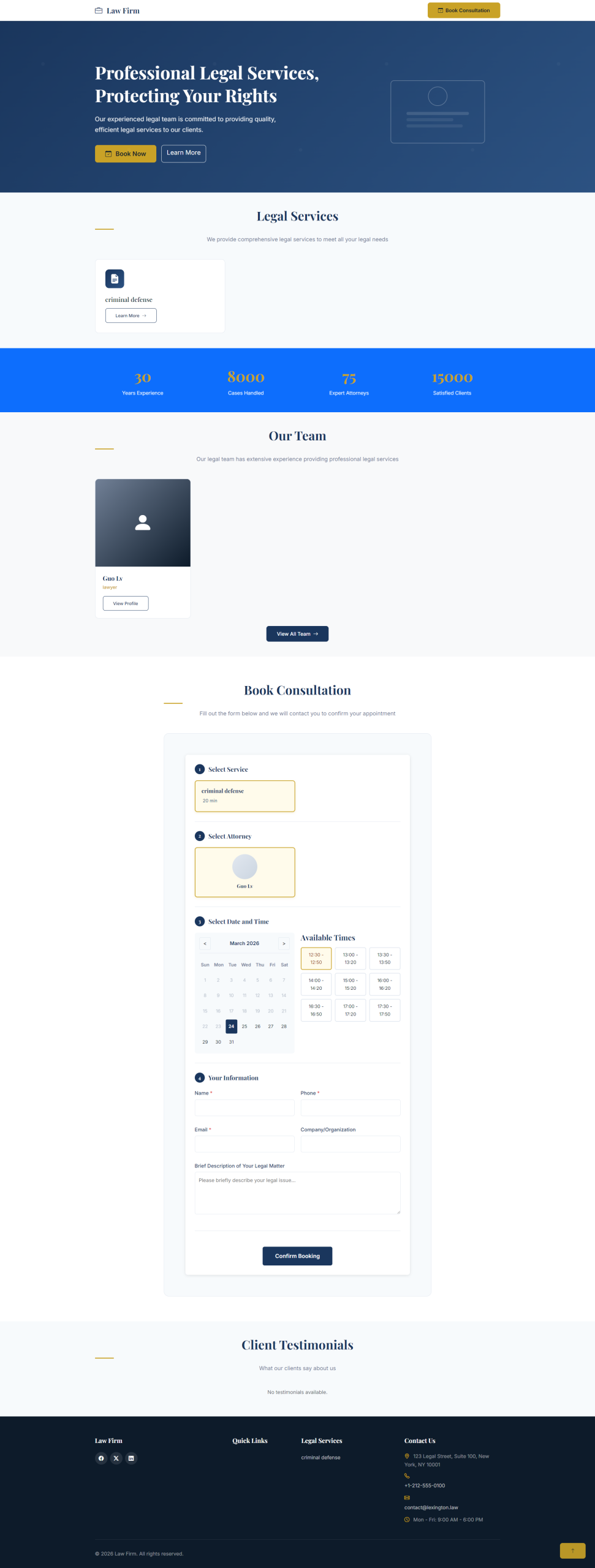
A professional WordPress theme for law firms, designed to emphasize trust, credibility, and team expertise. Built with Bootstrap 5.3, fully responsive, and WCAG accessibility compliant.The featured image is the style after installing the plugin
Features
Design Features
- Professional Design: Clean, modern design emphasizing trust and credibility
- Responsive Layout: Mobile-first approach, works on all devices
- Bootstrap 5.3: Built with latest Bootstrap framework
- Accessibility Ready: WCAG 2.1 AA compliant
- Custom Typography: Playfair Display for headings, Inter for body text
- Custom Color Scheme: Professional navy blue and gold accent colors
Theme Features
- Navigation Menus: Primary, Footer, and Legal menus
- Widget Areas: Blog sidebar and three footer widget areas
- Custom Logo Support: Upload your firm’s logo
- Featured Images: Support for post thumbnails
- Post Formats: Aside, gallery, link, image, quote, video, audio
Required Plugins
This theme requires the following plugins for full functionality:
Lexis Law Firm Functionality – Free Download
Provides custom post types and taxonomies:
- Team Members: Attorney profiles with position, contact info, bar number
- Legal Services: Service listings with pricing and duration
- Testimonials: Client testimonials with ratings
- Practice Areas: Taxonomy for team member specializations
- Service Categories: Taxonomy for organizing services
- Shortcodes: Team grid, services grid, testimonials, booking form
Legal Service Booking (Optional) – Highly Recommended
Professional booking system for legal services:
- Service scheduling and calendar management
- Staff availability and working hours
- Deposit payments integration
- Client CRM functionality
- Email/SMS notifications
Installation
Requirements
- WordPress 6.0 or higher
- PHP 8.0 or higher
Installation Steps
- Upload the
lexis-law-firmfolder to/wp-content/themes/ - Activate the theme through the ‘Appearance > Themes’ menu
- Install and activate the Lexis Law Firm Functionality plugin
- Configure theme settings in the Customizer
- Set up menus in Appearance > Menus
- Add widgets in Appearance > Widgets
Theme Setup
Setting Up Menus
- Go to Appearance > Menus
- Create menus for:
- Primary Navigation: Main site navigation
- Footer Menu: Quick links in footer
- Legal Terms Menu: Privacy Policy, Terms of Service, etc.
Adding Team Members
- Go to Team > Add New
- Enter attorney name and biography
- Upload a professional photo as featured image
- Fill in details:
- Position (e.g., Senior Partner, Associate)
- Email address
- Phone number
- LinkedIn profile URL
- Bar Number
- Assign Practice Areas
- Publish
Adding Services
- Go to Services > Add New
- Enter service title and description
- Upload a relevant image as featured image
- Configure service details:
- Duration (in minutes)
- Price
- Deposit amount (if applicable)
- Available attorneys
- Assign Service Category
- Publish
Adding Testimonials
- Go to Testimonials > Add New
- Enter testimonial title (for internal reference)
- Add the testimonial text in the content area
- Fill in details:
- Client Name
- Client Role/Company
- Rating (1-5 stars)
- Publish
Customizing Theme
Go to Appearance > Customize to configure:
- Site Identity: Site title, tagline, and logo
- Colors: Primary and accent colors
- Typography: Font settings
- Header: Navigation and header options
- Footer: Contact information and social links
Shortcodes
Team Grid
Display team members in a grid layout:
[lexington_team_grid columns="3" limit="6"]Parameters:
columns: Number of columns (1-4), default 3limit: Maximum number to display, default -1 (all)
Services Grid
Display services in a grid layout:
[lexington_services_grid columns="3" limit="6"]Parameters:
columns: Number of columns (1-4), default 3limit: Maximum number to display, default -1 (all)
Testimonials
Display client testimonials:
[lexington_testimonials limit="3"]Parameters:
limit: Maximum number to display, default 3
Booking Form
Display the booking form:
[lexington_booking_form]Parameters:
service_id: Pre-select a service (optional)staff_id: Pre-select a staff member (optional)
Page Templates
Default Template
Standard page with sidebar layout.
Full Width Template
Full-width page without sidebar.
Front Page Template
Custom homepage with sections for:
- Hero banner
- Services overview
- Team introduction
- Client testimonials
- Statistics
- Booking section
Widget Areas
Blog Sidebar
Displays on blog and single post pages.
Footer Widgets
Three widget areas in the footer:
- Footer Left: Company info and social links
- Footer Center: Quick links menu
- Footer Right: Contact information
Customization
Child Theme
Create a child theme for customizations:
<?php
// style.css
/*
Theme Name: Lexis Law Firm Child
Template: lexis-law-firm
*/

// functions.php
<?php
add_action('wp_enqueue_scripts', 'child_theme_styles');
function child_theme_styles() {
    wp_enqueue_style('parent-style', get_template_directory_uri() . '/style.css');
}
Custom CSS
Add custom CSS in Appearance > Customize > Additional CSS:
/* Change primary color */
:root {
    --lex-primary: #1a365d;
    --lex-accent: #c9a227;
}

/* Custom button style */
.btn-accent {
    background: #your-color;
}
Template Overrides
Copy template files to your child theme:
your-child-theme/
├── header.php
├── footer.php
├── single.php
├── archive.php
└── template-parts/
    ├── content-service.php
    └── content-team.php
Theme Hooks
Actions
lexis_before_header– Before header sectionlexis_after_header– After header sectionlexis_before_footer– Before footer sectionlexis_after_footer– After footer sectionlexis_before_content– Before main contentlexis_after_content– After main content
Filters
lexis_custom_logo_args– Modify logo argumentslexis_nav_menu_args– Modify menu argumentslexis_body_classes– Add body classes
Recommended Plugins
- Lexis Law Firm Functionality: Required for Team, Services, Testimonials
- Legal Service Booking: Highly recommended professional booking system with scheduling, staff management, and payment integration
- Yoast SEO: Search engine optimization
- WP Super Cache: Performance optimization
- Wordfence Security: Security protection
Browser Support
- Chrome (latest)
- Firefox (latest)
- Safari (latest)
- Edge (latest)
- IE 11 (limited support)
Accessibility
This theme follows WCAG 2.1 AA guidelines:
- Semantic HTML structure
- Keyboard navigation support
- Screen reader friendly
- Color contrast compliance
- Skip to content link
- Proper heading hierarchy
Performance
Optimized for fast loading:
- Minimal HTTP requests
- Optimized CSS and JS
- Lazy loading for images
- CDN-ready for Bootstrap and fonts
Support
For support, please contact:
- Email: 1601800014@qq.com
Changelog
1.0.0
- Initial release
- Responsive design with Bootstrap 5.3
- Integration with Lexis Law Firm Functionality plugin
- WCAG accessibility compliance
- Widget areas: Blog sidebar, Footer widgets
- Customizer options for theme settings
License
Proprietary License
This plugin is commercial software. Purchase grants you a non-exclusive, non-transferable license to:
- Use the plugin on a single website
- Receive updates during your subscription period
- Access email support
You may NOT:
- Redistribute the plugin
- Modify and distribute the code
- Use on more sites than licensed
For multi-site licenses or enterprise pricing, contact: 1601800014@qq.com
Credits
- Bootstrap 5.3 – https://getbootstrap.com/
- Bootstrap Icons – https://icons.getbootstrap.com/
- Google Fonts (Inter, Playfair Display) – https://fonts.google.com/
User Reviews